

Why Copilot in Power BI Is Only as Trustworthy as the Semantic Model Underneath It
This week has built toward one point. Day 1 argued that more data doesn't fix decision-making, trust does. Day 2 showed what happens without that trust: dashboards disagreeing over numbers that are each correct by their own definition. Day 3 named the fix, a semantic model, and Day 4 placed it architecturally in Fabric and Power BI, built on OneLake, reused across reports instead of forked per report.
Today is where all of that becomes visible to a business user, because it's where AI enters the picture. Copilot and natural-language Q&A in Power BI don't sit apart from everything covered this week. They sit directly on top of it, and they inherit every property (good or bad) of the model underneath.
Key Takeaways
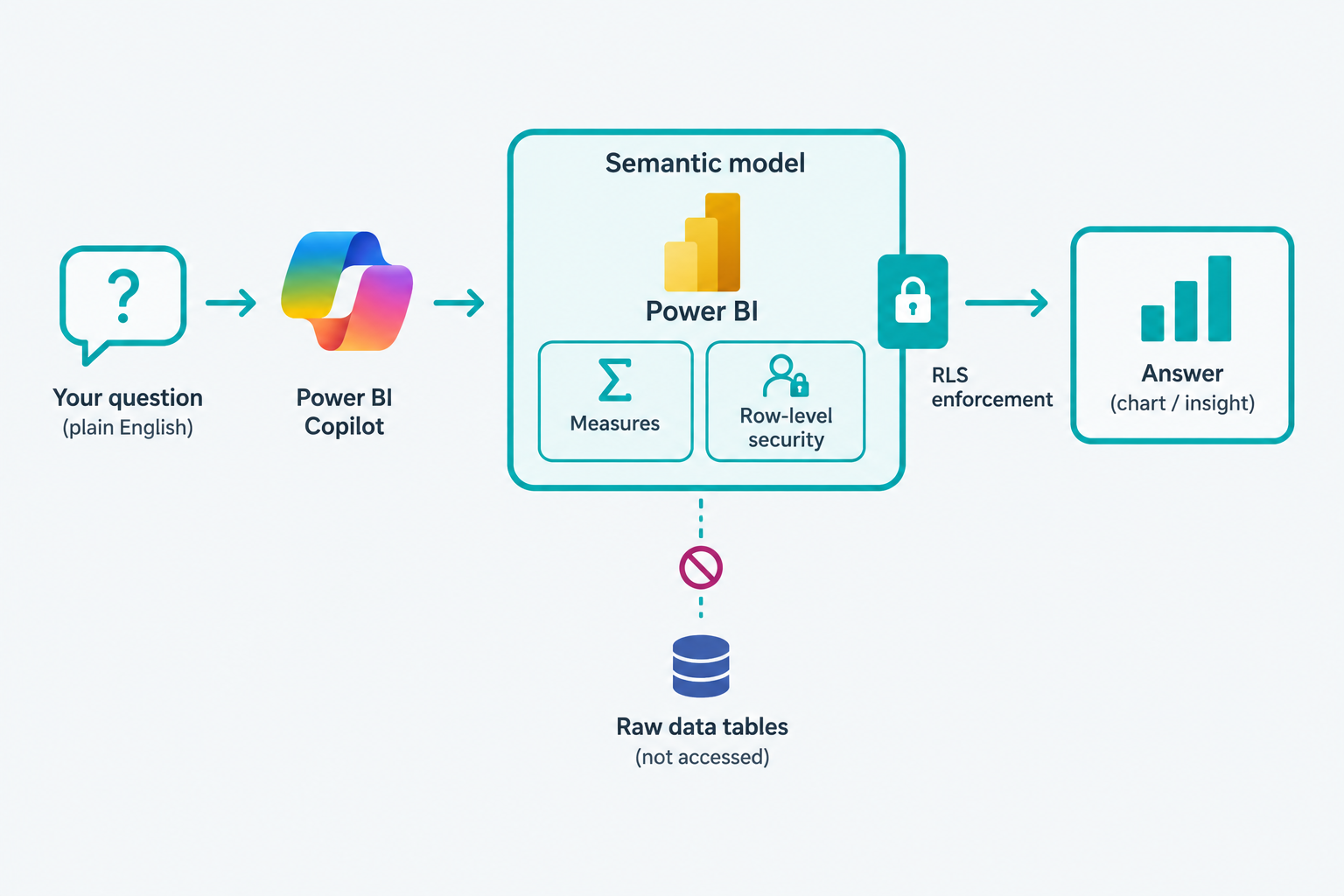
- Copilot doesn't reason over your raw data. It queries your existing semantic model and returns the result as an answer, a visual, or a generated DAX measure, per Microsoft's own documentation.
- Copilot can only access data the current user has permission to access. Microsoft says that access depends on the user's security roles and permissions. That only protects you if row-level security was configured and tested correctly before Copilot was turned on.
- Verified answers let a model owner lock in a trusted response to a specific question at the model level, so every report using that model gets the same vetted answer instead of a freshly generated one each time.
- AI doesn't fix an ungoverned model. It queries whatever is there, faster and with more apparent confidence, which is why the readiness work is identical to the semantic-model work from Days 3 and 4, not a separate project.
How Copilot Actually Uses the Semantic Model
When a question relates to your data, Copilot queries the semantic model and returns the result, it doesn't reason freely over source data the way a general-purpose AI assistant might (Microsoft Learn). That single fact explains most of what Copilot can and can't do well.
Three concrete behaviors follow from it. Natural-language Q&A maps a plain-English question to existing measures, columns, and relationships already defined in the model, rather than inventing a calculation from scratch. Ask "what were our top five regions by margin last quarter" and Copilot resolves "margin," "region," and "last quarter" against measures, columns, and date-table logic that already exist, the same way a human report builder would, just faster.
AI-generated DAX measures work the same way in reverse. In web modeling, Copilot can create and edit measures and relationships directly, but only for a user who already has Write permission on the model. It asks for permission once at the start of each session, then applies changes to the open model, with a restore checkpoint so that session's changes can be rolled back (Microsoft Learn). Because changes land directly, the review has to be deliberate. Treat a generated measure as a draft, and put it through the same governance discipline from Day 2 before anyone else reuses it.
Report narratives are generated from the same governed aggregations already surfaced on the report, so a narrative claim traces back to a real, auditable measure rather than an invented summary. If the underlying measure is wrong, the narrative will describe that wrong number fluently and persuasively, which is precisely why the narrative layer can't be the place trust gets established.
In every case, the semantic model is the ceiling. Copilot can present what's in the model clearly and quickly. It cannot make what's in the model more correct than it already was.
What Happens When the Model Isn't Ready
Picture a hypothetical, illustrative scenario built directly on Day 2's "Active Customer" problem. Say a company never reconciled its three competing definitions, and rolls out Copilot anyway. A sales director asks, in plain English, how many active customers the company has this quarter.
Copilot doesn't know there were ever three competing definitions. It queries whichever measure the semantic model happens to expose (possibly the first one it finds, possibly whichever one is most prominently named), and returns a single, clean-looking number with full confidence. No caveat, no "depending on which definition you mean," no indication that two other equally valid numbers exist. The sales director takes it into a board meeting. Finance, using their own definition in their own report, has a different number ready for the same meeting.
Nothing about this is a Copilot malfunction. It behaved exactly as documented: it queried the model and returned an answer. The failure happened earlier, at the point where three definitions were allowed to exist without anyone reconciling them. Copilot just delivered that unresolved conflict faster, in a more convincing format, to a more senior audience than a static dashboard ever would have.
The uncomfortable part is that this failure mode is harder to catch than Day 2's original version. A dashboard with a visibly wrong number invites scrutiny, someone eventually compares it to another report and starts asking questions. A confident, conversational Copilot answer doesn't carry that same visible seam. It reads as authoritative by design, which means the burden of catching the error shifts entirely onto whether the underlying model was governed before anyone ever asked it a question.
Row-Level Security Doesn't Get a Pass
One specific risk deserves its own section because it's easy to assume incorrectly. Copilot doesn't get a wider view of the data than the person asking. Microsoft states that Copilot can only access data the current user has permission to access. Data retrieval is scoped to the authenticated user's permissions (Microsoft Learn). Its Copilot FAQ adds that this access depends on the user's security roles and permissions. Prompting Copilot for data you can't see won't retrieve it (Microsoft Learn). A user whose row-level security role limits them to their own region's data should get that same limit in a Copilot answer.
That's reassuring, but it only holds if RLS was configured and tested correctly before Copilot was turned on. Two documented details make that a genuine pre-flight check, not an afterthought. First, whether RLS is enforced depends on the user's permissions on the semantic model. Microsoft advises giving people only Read permission on the model when RLS must be enforced (Microsoft Learn). Second, verified answers aren't a security boundary: Microsoft says RLS and object-level security aren't fully supported as security features for them. It advises not relying on verified answers that way during preview (Microsoft Learn).
Test each role with the View As option in Power BI Desktop before expanding access (Microsoft Learn). And a model with no RLS configured doesn't get RLS added by enabling Copilot. Anyone with permission to read that model can get the same unfiltered data through Copilot that any report built on it would show them.
Verified Answers: Locking In a Trusted Response
One feature worth understanding on its own is verified answers. A model owner can prepare a semantic model specifically for AI by defining an AI data schema, adding instructions, and setting verified answers, and marking the model as Approved for Copilot once that work is done (Microsoft Learn).
A verified answer works like this: the model owner ties a specific trigger phrase to a specific, pre-approved visual or response. When a user's prompt matches that trigger phrase closely enough, Copilot returns the verified answer directly instead of generating a fresh response (Microsoft Learn). Because this lives at the model level, not the report level, every report built on that model benefits from the same vetted answer, which is the same "define once, reuse everywhere" principle from Day 3 applied directly to AI output.
This matters most for the handful of questions your organization gets asked constantly and needs answered exactly the same way every time (a board-level revenue figure, a compliance-sensitive metric). It isn't meant to cover every possible question, and treating it that way defeats the point of natural-language flexibility in the first place.
What Readiness Actually Requires
None of this is a new checklist separate from Days 3 and 4. It's the same work, evaluated against a higher-stakes consumer.
A semantic model with governed measures, documented naming, working row-level security, and a domain-based architecture that Days 3 and 4 described is, by definition, most of the way to Copilot-ready. What's left is AI-specific, and it breaks down into three concrete tasks rather than one vague "make it AI-ready" step.
First, schema simplification: exposing only the tables, columns, and measures a business user would actually recognize, and hiding the technical artifacts (surrogate keys, staging tables, intermediate calculation steps) that only ever confused a report builder and would confuse Copilot's field-matching just as easily. Second, clear naming: action-oriented table names and descriptive column names give Copilot the same disambiguating signal they give a human, which is why Day 3's naming-and-description requirement isn't optional groundwork, it's the literal input Copilot's matching depends on. Third, explicit AI instructions and a small set of verified answers for the handful of questions that need one consistent, pre-approved response every time.
Skipping the earlier steps and jumping straight to enabling Copilot is the exact failure mode this whole series has been describing, just with a faster, more confident-sounding narrator attached to it.
Where This Fits
At ClarusIQ, this is where Power BI Reporting work turns into Applied AI work: once a semantic model is certified and architected correctly, preparing it for Copilot (schema, instructions, verified answers, RLS validation) is a scoped, specific project, not a leap of faith.
That sequencing matters more than it might sound. A Copilot readiness review that starts by asking "what should our AI instructions say" before confirming the underlying measures are governed and RLS is tested is solving the wrong problem first. The review that works starts exactly where Days 3 and 4 left off: audit what's already in the model, fix what's ungoverned there, and only then layer the AI-specific preparation on top. Doing it in the other order tends to produce a Copilot rollout that answers confidently and occasionally wrong, which is a harder problem to catch than a rollout that visibly doesn't work yet.
If you're evaluating a Copilot rollout, or one is already live and you're not fully confident in what it would say under pressure, Book a Reporting Diagnostic to assess your semantic model's Copilot readiness before expanding access further.
Next in this series: once Copilot reliably answers questions, the next gap is what happens after the answer, and why automation only belongs at the end of this sequence, not the beginning.
New articles and white papers are shared on ClarusIQ's LinkedIn page