

Where Semantic Models Actually Live in Microsoft Fabric and Power BI
In what a semantic model actually is, we covered what belongs inside one: governed measures, relationships, naming, row-level security. That's the content question. Today's is the architecture question: where does this thing physically live in Microsoft's stack, and how does it relate to Fabric, OneLake, and the Power BI reports built on top of it.
Getting the contents of a semantic model right and still placing it in the wrong spot architecturally is a common, specific failure mode. It's worth understanding both halves separately.
Key Takeaways
- OneLake is Fabric's single store for all analytics data (Microsoft Learn), and Delta is the unified table format across all of Fabric's compute engines (Microsoft Learn).
- Direct Lake mode lets a Power BI semantic model load data straight from Delta tables in OneLake, without importing a full copy of it first (Microsoft Learn).
- Microsoft has renamed "Power BI dataset" to "Power BI semantic model." It's the same object under a name that better describes what it does.
- The most common architecture mistake is treating each new report as a reason to spin up a new, separate semantic model instead of connecting to one shared model. Fabric doesn't prevent this by default; the discipline has to be deliberate.
The Fabric Stack in Plain Terms
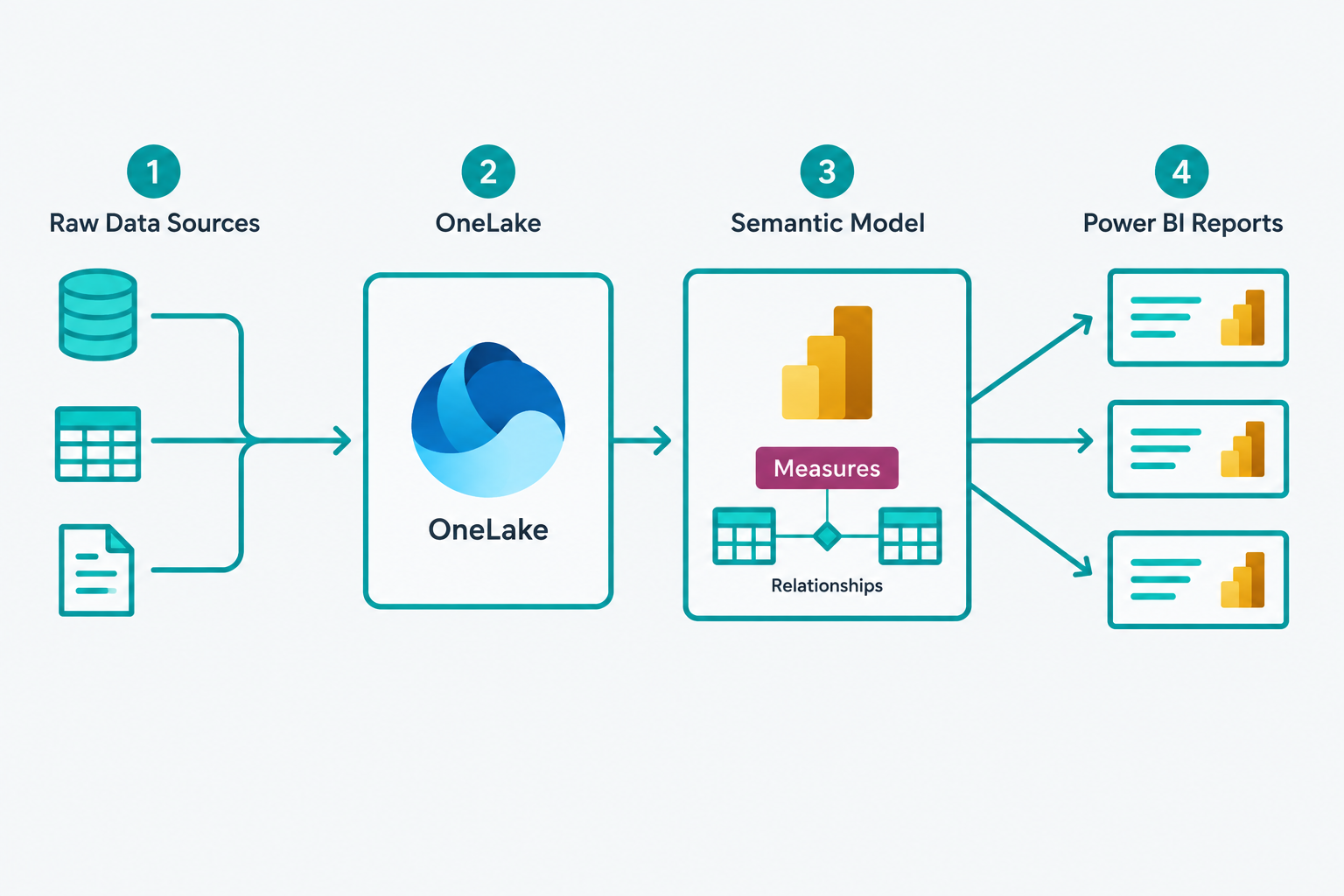
Four layers, in order. Raw data sources (your CRM, ERP, product database, spreadsheets) land in OneLake, Fabric's single unified data store for all analytics data. Lakehouses and warehouses store their tables there in Delta format, which Microsoft describes as the unified table format across all of Fabric's compute engines (Microsoft Learn). That shared format is what makes it "one lake" instead of yet another set of disconnected copies.
On top of that sits the semantic model, the governed layer from Day 3. And on top of the semantic model sit however many Power BI reports need it, each one querying the same model instead of recreating its own version of the underlying logic.
This is a genuinely different architecture from the older pattern of importing a static copy of data into each individual Power BI file. Fabric's design intent is one shared data layer, one shared semantic layer, and many reports pulling from both.
Lakehouse or Warehouse: Does It Matter for the Semantic Model?
Fabric offers two different item types for the layer between OneLake and the semantic model: a lakehouse and a warehouse. A lakehouse is built around Spark-based engines and is comfortable with a mix of structured and less-structured data. A warehouse is built around a T-SQL engine and behaves closer to a traditional relational data warehouse. Teams sometimes treat this as a bigger decision than it needs to be for semantic modeling specifically.
From the semantic model's perspective, the distinction matters less than it seems, because both item types write their data into OneLake in the same Delta table format. A semantic model built on Direct Lake can read Delta tables that originated from a lakehouse or a warehouse without caring which one produced them. The choice between lakehouse and warehouse is real and worth making deliberately, but it should be driven by your team's engine preference and existing SQL versus Spark skill set, not by an assumption that only one of them supports a proper semantic model on top.
What Direct Lake Actually Changes
The mechanism worth understanding here is Direct Lake, a storage mode for Power BI semantic models built specifically for Fabric. Instead of importing a full copy of the data into the model (the traditional approach), Direct Lake loads the columns a query needs into memory straight from Delta tables in OneLake. A Direct Lake refresh copies only metadata, not the data itself (Microsoft Learn).
Two things follow from that. First, there's no full imported copy of the data sitting inside the semantic model and drifting out of sync between scheduled refreshes. With automatic updates turned on, the model stays in sync with its Delta tables (Microsoft Learn). Second, it fits Microsoft's rename of "Power BI dataset" to "Power BI semantic model." The old name suggested a static extract, and a Direct Lake model often isn't one: it's a governed logic layer over data that stays current.
None of this changes what belongs inside the model (Day 3's answer still holds). It changes how the model gets its data, and it removes one entire category of staleness problem that used to exist by default.
Import mode still has a place. A semantic model built for heavy, complex transformations, or one that needs to work fully offline from its source, may still be better served by importing and shaping the data first. Direct Lake is the default worth reaching for when the priority is fresh data with minimal duplication, not a rule that every model must follow regardless of its actual requirements.
The Common Architecture Mistake
Here's where teams undo the benefit of this design without realizing it. Fabric makes it just as easy to create a new semantic model per report as it does to reuse an existing one: open a lakehouse or warehouse, select "New semantic model," pick some tables, and a report builder has their own model in a few clicks. Nothing in the platform stops this by default.
Do that repeatedly across a team and you've quietly recreated Day 2's problem inside a modern architecture. Five report-specific semantic models means five places "Net Revenue" can be defined slightly differently, even though they're all technically built the same way, on the same underlying OneLake data. The technology changed. The failure mode didn't.
Picture a hypothetical, common pattern: a finance analyst builds a revenue-tracking report and creates a new semantic model to power it. Three months later, an operations analyst needs a similar revenue view for a different purpose and, not knowing the finance model exists or how to find it, builds a second one from the same underlying warehouse tables. Both models are technically correct. Neither analyst did anything wrong given what they could see. The organization now has two governed-sounding, professionally built semantic models quietly disagreeing with each other, which is a harder problem to untangle than the ungoverned reports from Day 2, because these ones look official.
The fix is procedural, not technical: before creating a new semantic model, the first question should be whether an existing one already covers this data domain. If it does, connect to it. If it genuinely doesn't (a new data domain nobody has modeled yet), that's when a new model is warranted, and it should be built with the intent of being the shared model for that domain going forward, not a one-off. A short, visible catalog of which semantic model owns which domain, even a simple shared document, prevents the scenario above more reliably than any platform setting.
How to Actually Architect This
In practice, this means organizing semantic models around business domains (sales, finance, product, operations), not around individual reports or individual report authors. Each domain gets one certified semantic model. Report builders connect to the domain model that covers their question rather than importing raw tables and starting from scratch.
When a report genuinely needs data from more than one domain, Power BI's composite models let a report combine multiple existing semantic models rather than forcing a single, ever-growing monolith or, worse, a fresh redundant copy of everything. The goal isn't one semantic model for the entire company. It's one semantic model per domain, reused deliberately, built and maintained through the same workflow Microsoft documents for creating a semantic model directly from a lakehouse or warehouse item (Microsoft Learn).
Three practical signals tend to confirm a domain boundary is drawn correctly. The people who would argue about a given metric's definition all sit inside that one domain, not spread across two. The tables the model depends on come from a coherent, related set of source systems, not an arbitrary mix. And a new report request for that subject area can almost always be answered by connecting to the existing model rather than proposing a new one. When a team finds itself justifying a new semantic model every few weeks for what's plausibly the same subject area, that's usually a sign the domain boundaries were never actually agreed on, not a sign that Fabric needs more models.
Where This Fits
At ClarusIQ, this is where Data Foundation work and Power BI Reporting work meet directly: once a semantic model's contents are right (Day 3), the architecture question is whether it's organized by domain, built on Direct Lake against OneLake where it makes sense, and actually being reused instead of quietly forked per report. That review usually starts with a simple inventory: how many semantic models currently exist in the tenant, which business domain each one is supposed to cover, and how much overlap exists between models that were never meant to compete with each other.
Most organizations that have been on Fabric or Power BI for more than a year are surprised by that inventory. It's rarely zero duplicates, and it's rarely deliberate duplication either. It's the natural result of a platform that makes creating a new model easy and reusing an existing one only slightly easier, without a habit already in place to default toward reuse.
If you want a second set of eyes on how your current Fabric or Power BI environment is architected, Book a Reporting Diagnostic.
Next in this series: once this architecture is solid, it becomes the exact foundation Copilot and natural-language AI features query, and why that dependency runs in one direction only.
New articles and white papers are shared on ClarusIQ's LinkedIn page